
HTTP requests
An HTTP request in Zorvik is a method, a URL, headers, an optional body, auth and a few settings. This page covers the first four; the other parts have their own pages.
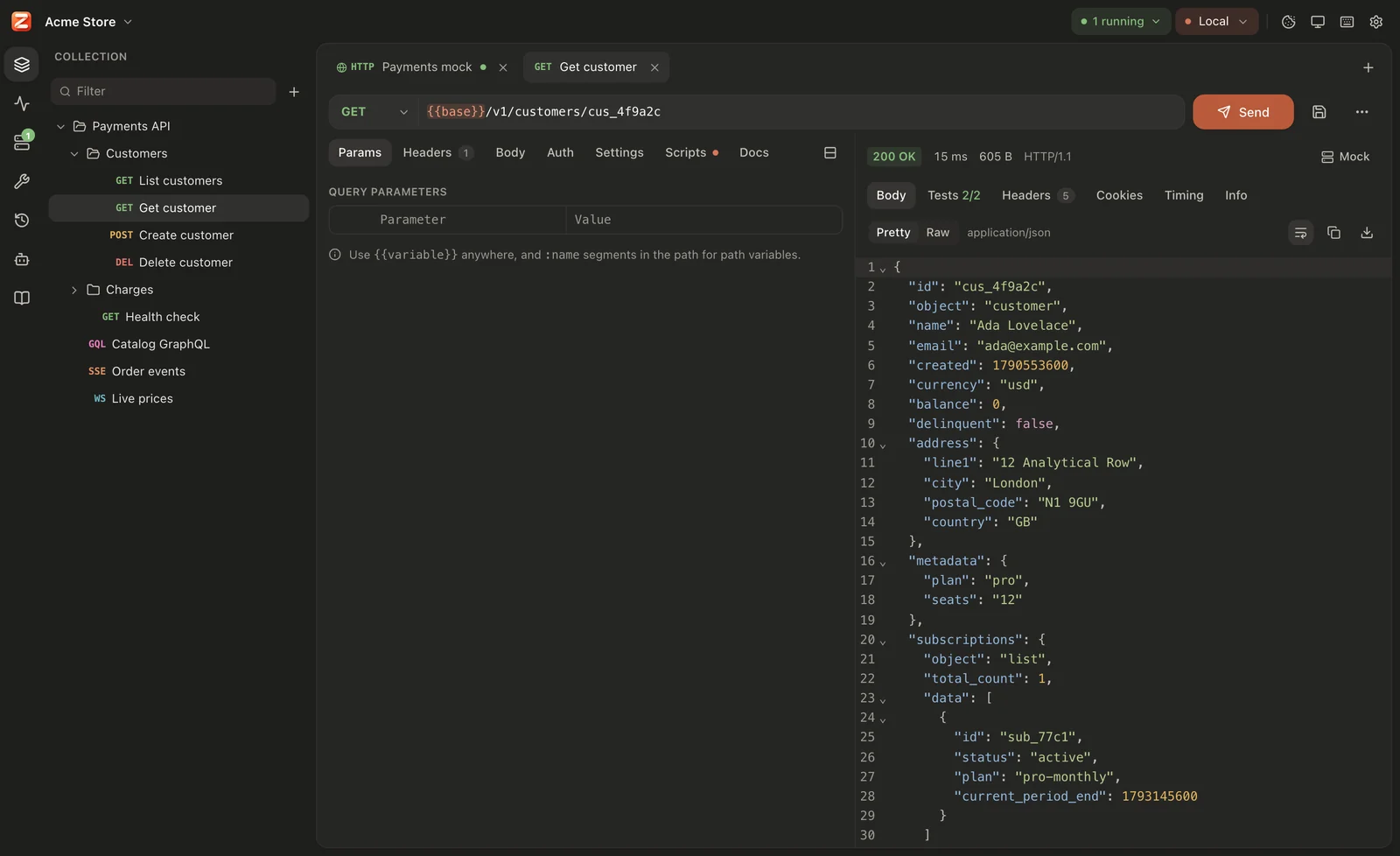
The request editor
Section titled “The request editor”Across the top is the URL bar: the method, the URL, Send, the save button and More actions (⋯). Below it are the request’s tabs:
| Tab | Holds | See |
|---|---|---|
| Params | Query parameters and path variables | below |
| Headers | Request headers | below |
| Body | The body; the tab shows its type, e.g. JSON | Request bodies |
| Auth | How the request authenticates; the tab shows the type unless it inherits | Auth |
| Settings | Timeout, redirects, TLS verification, HTTP version and decompression for this request | HTTP versions, timeouts & redirects |
| Scripts | Pre-request and post-response JavaScript; a dot shows when there are scripts | Scripts & tests |
| Docs | Notes about the request in Markdown, saved with it |
The Params and Headers tabs show how many enabled rows they have.
More actions (⋯) has Copy as cURL or code…, Load test this request… and Save as… (save a copy under another name or folder).
Method
Section titled “Method”Open the method menu on the left of the URL to choose GET, POST, PUT, PATCH, DELETE, HEAD or OPTIONS.
For any other method, type it into Custom method… at the bottom of the menu and press Enter, for example PROPFIND or PURGE. Custom methods may use the letters A–Z, digits, _ and -, and are uppercased as you type.
New requests start as GET. Switching the body to GraphQL changes a GET to POST.
In the sidebar and tab badges, long method names are shortened: DEL, OPT, PTCH, and any method longer than five letters shows its first four followed by ….
Type or paste the full address into the URL field:
https://api.example.com/v2/users/:id/orders?status=open&limit=20- Scheme:
http://orhttps://. A URL without a scheme is sent ashttp://. Other schemes belong to other request kinds (ws://,grpc://, …). - Variables:
{{name}}can appear anywhere in the URL, for example{{baseUrl}}/users. Known variables are highlighted, undefined ones turn red, and hovering one shows its value and where it comes from. Type{{for suggestions. See Variables & environments. - Credentials:
https://user:password@host/is not sent in the URL. Like curl, Zorvik turns it into anAuthorization: Basic …header, unless the request already has anAuthorizationheader. - Fragment: anything after
#is never sent. - IPv6: put the address in brackets,
http://[::1]:8080/.
Press Enter in the URL field (or Mod+Enter anywhere) to send. Mod+L jumps to the URL field.
Query parameters
Section titled “Query parameters”The Params tab shows the URL’s query string as a table under Query parameters. The table and the URL are two views of the same thing: edit either and the other follows.
- Each row is one
key=valuepair, in URL order. A key without=(such as?verbose) shows with an empty value. - The checkbox switches a row off. A switched-off parameter leaves the URL but stays in the table (it is saved as
disabledParamsin the request file), so you can switch it back on later. - Drag the handle on the left of a row to reorder parameters. The trash icon removes one.
- Values appear exactly as in the URL; they are not decoded. When you edit the table,
&,#and=in keys and&and#in values are percent-encoded so they can’t break the query string. Other characters are left as you typed them. - Keys and values can contain
{{variables}}. - Parameters imported with a description (from Postman or OpenAPI) show an ⓘ next to the name; hover it to read the description.
Path variables
Section titled “Path variables”A path segment that starts with : is a path variable:
{{baseUrl}}/users/:userId/orders/:orderIdEach one gets a row under Path variables in the Params tab, in the order it appears. Fill in the values there:
| Key | Value |
|---|---|
userId | 42 |
orderId | {{orderId}} |
Sends …/users/42/orders/<value of orderId>.
- Rows follow the URL: adding
:nameto the path adds a row; removing it removes the row. You can’t add, rename or switch off rows by hand. - Only whole path segments count.
:namein the host, the port or the query string is left alone, sohttp://localhost:8080/is not a path variable. - The name is everything after
:up to the next/. - Values can contain
{{variables}}. After variables are resolved, the value is percent-encoded as one segment: a space becomes%20and/becomes%2F. - A path variable with an empty value is sent as written (
:orderId) and listed in the Sent with undefined values warning. - The same name used twice in one path gets one row, and both places get its value.
Path variables are stored in the request file as pathParams.
Headers
Section titled “Headers”The Headers tab is a table of header names and values.
- Header names are suggested as you type:
Accept,Authorization,Content-Type,X-Request-IDand other common ones. - Names and values can contain
{{variables}}. - The checkbox switches a header off without deleting it. Rows can be reordered by dragging.
- Bulk edit turns the table into text, one
Name: valueper line. A line starting with//is a switched-off header. Table switches back.
Accept: application/jsonX-Request-ID: {{$uuid}}//X-Debug: trueHeaders Zorvik adds
Section titled “Headers Zorvik adds”Unless you set them yourself, Zorvik adds:
| Header | Value | When |
|---|---|---|
Host | The URL’s host and port | HTTP/1.1 (HTTP/2 and HTTP/3 send it as :authority) |
User-Agent | Zorvik/ and the app version | Settings → Requests → Default headers is on (the default) |
Accept | */* | Default headers is on |
Accept-Encoding | gzip, deflate, br, zstd | Default headers and Decompress responses are both on |
Content-Type | From the body type | The request has a body. See Request bodies. |
Content-Length | The body’s size | The request has a body, or its method is POST, PUT or PATCH |
Authorization, or an API key header | From the auth settings | See Auth |
Cookie | Matching cookies from the jar | The cookie jar is on. See Cookies. |
The response’s Info tab lists every header that was really sent, under Request sent.
- Inherited headers. Headers from the workspace (Workspace settings → Default headers) and from each folder around the request (Folder settings → Headers) are sent too. When two levels set the same name, compared without regard to case, the one closest to the request wins. See Workspaces.
Content-LengthandTransfer-Encodingthat you set are ignored. Zorvik always frames the body itself.Host: aHostheader you set replaces the URL’s host. On HTTP/2 and HTTP/3 it becomes the:authoritypseudo-header.- HTTP/2 and HTTP/3 don’t allow connection-specific headers.
Connection,Keep-Alive,Proxy-Connection,Transfer-EncodingandUpgradeare left out there, and on HTTP/3 aTEheader other thanTE: trailersis left out too. - Line breaks in a header value are not allowed; the request fails with Invalid value for header.
- Rows with an empty name, and switched-off rows, are not sent.
In the request file
Section titled “In the request file”Everything on this page is stored in the request’s YAML file:
name: Get orderseq: 1method: GETurl: "{{baseUrl}}/users/:userId/orders/:orderId?expand=items"disabledParams: - key: debug value: "true" enabled: falsepathParams: - key: userId value: "42" - key: orderId value: "{{orderId}}"headers: - key: Accept value: application/json - key: X-Debug value: "1" enabled: falsedocs: | Returns one order with its items.Enabled query parameters are part of url; switched-off ones are in disabledParams, and descriptions of enabled ones are in paramDescriptions. See Workspace format.