
Mock APIs
A mock API is a local HTTP server that answers with the responses you define. Use it to build a front end before the backend exists, to test how a client handles errors and slow answers, or to stand in for a third-party service in tests.
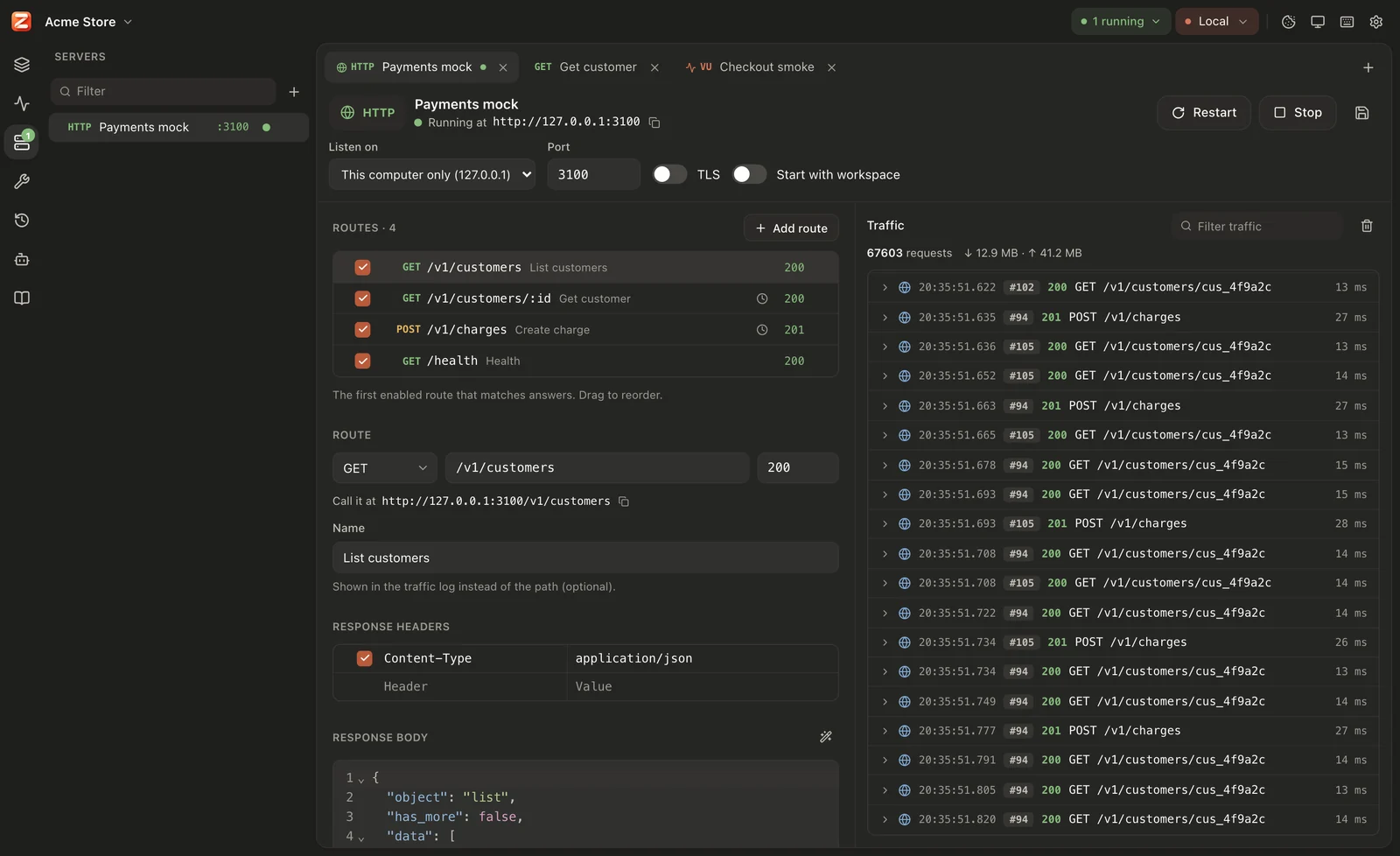
A mock API is a list of routes. Each route says “for this method and path (and, optionally, these query parameters, headers or body), answer with this status, these headers and this body”. It speaks HTTP/1.1 and HTTP/2, and can listen with TLS. Like every server, it is saved as a YAML file under servers/ in the workspace, so it is shared through Git.
Create a mock API
Section titled “Create a mock API”Open the Servers sidebar, click + (New server) and choose Mock API (HTTP). Give it a name. The new mock listens on 127.0.0.1, port 3000 (or the next port no other saved server uses), and has one route to start from: GET /hello answering 200 with {"message": "Hello from Zorvik"}.
Press Start (or Mod+Enter) and call it at the address shown, for example http://127.0.0.1:3000/hello.
You can also build a mock from what you already have: an OpenAPI document, a folder of requests, or a response you just received. See Mocks from OpenAPI, folders and responses.
Routes
Section titled “Routes”The Routes section lists the routes. Each row shows an on/off checkbox, the method, the path, the route’s name, a clock when it has a delay, a lightning bolt when it has a fault, and the status.
- Add route adds
GET /new(or/new-2, …) answering200with a JSON body. - Click a row to edit that route below the list. Arrow keys move through the list.
- Drag a row by its handle to reorder it, or use Move up / Move down in its ⋯ menu. The menu also has Duplicate and Delete.
- Unchecking a route turns it off: it never answers and is not listed in 404 answers.
Route fields
Section titled “Route fields”| Field | Description |
|---|---|
| Method | ANY (saved as *), GET, POST, PUT, PATCH, DELETE, HEAD or OPTIONS. Another method written in the file (such as PROPFIND) is kept and matched. |
| Path | The path pattern, see Paths. |
| Status | The status code, 100 to 999. The field suggests common codes. |
| Name | Optional. Shown in the traffic log instead of the method and path. |
| Response headers | Header rows. Names and values may use templates. |
| Response body | The body, with syntax highlighting chosen from the Content-Type header (JSON, HTML, XML, JavaScript or text). Format JSON reformats a JSON body. The body may use templates. |
| Delay (ms) | Wait this long before answering. See Faults, delays & CORS. |
| Fault and How often (%) | Answer with an error, drop the connection, or never answer, some or all of the time. See Faults, delays & CORS. |
| Match only when | Extra conditions on query parameters, headers and the body. See Conditions. |
While the server runs, the route editor shows the route’s full address (Call it at …) with a copy button.
| Pattern | Matches | Parameters |
|---|---|---|
/users | Exactly /users | none |
/users/:id | /users/42, /users/abc | {{request.params.id}} |
/users/{id} | Same as :id (OpenAPI style) | {{request.params.id}} |
/orgs/:org/repos/:repo | /orgs/acme/repos/api | org, repo |
/files/* | /files, /files/a, /files/a/b/c.txt | {{request.params.*}} is the rest: a/b/c.txt |
* | Every path | {{request.params.*}} is the whole path without the leading / |
/a/*/c | /a/b/c, /a/x/c (one segment, any value) | none |
/search?type=user | /search with type=user in the query | none |
Rules:
- A parameter (
:nameor{name}) matches exactly one path segment. Its value is percent-decoded:/name/j%C3%BCrgengivesjürgen. - A
*as the last segment matches the rest of the path, including nothing. A*anywhere else matches one segment and is not captured. - Literal segments are case-sensitive and compared after percent-decoding.
- A trailing slash doesn’t matter, and neither do repeated slashes:
/users/42/matches/users/:id. - A query in the pattern (
?type=user) is an extra condition, like a row under Query parameters. Anything after#is ignored. {{id}}is not a parameter in a route path; it is compared as literal text. Write:id.
Methods
Section titled “Methods”A route’s method matches case-insensitively. ANY (*, or an empty method) matches every method.
HEAD requests use GET routes when no route matches HEAD itself. The answer has the headers and the Content-Length a GET would get, without a body.
Conditions
Section titled “Conditions”Open Match only when to add conditions. A route answers only when all its conditions hold.
| Condition | Holds when | Empty value |
|---|---|---|
| Query parameters | The request has the parameter with exactly this value (after decoding %XX and +). Any of its values may match when it repeats. Names are case-sensitive. | The parameter is present, with any value. |
| Headers | The request has the header (name in any case) with exactly this value (surrounding spaces ignored; the value is case-sensitive). | The header is present, with any value. |
| Body contains | The request body contains this text (case-sensitive). | No condition. |
Condition values may use variables such as {{role}} (from the active environment or the workspace), but not request values. Rows that are unchecked or have no name are ignored. A header name that is not a valid HTTP header name never matches.
Route order
Section titled “Route order”For each request the mock goes through the routes from top to bottom and uses the first enabled route whose method, path and conditions all match. Put specific routes above general ones:
| # | Route | Answers |
|---|---|---|
| 1 | GET /users/me | the signed-in user |
| 2 | GET /users/:id with header Authorization = (any value) | a user |
| 3 | GET /users/:id | 401 with an error body |
| 4 | ANY * | 404 in your API’s error format |
With this order, /users/me never reaches route 2, requests without an Authorization header fall through to route 3, and everything else gets route 4 instead of the built-in 404.
Edits apply to the next request, also while the server runs and before you save.
The response
Section titled “The response”Status. The route’s status is sent as is. A status the server can’t send (below 100) answers 500 instead and logs Route …: status 42 is not valid, answered 500 instead.
Headers. Every checked row with a name is sent, in order; the same name may appear more than once. Names and values may use templates; values are trimmed. Content-Length and Transfer-Encoding rows are ignored, because the mock sets them from the body. A header that isn’t valid after templating is left out and logged as Route …: header ”…” is not valid and was left out.
Body. The body is sent after templating. Answers with status 1xx, 204 or 304 never have a body (the editor says so).
Content-Type. When the body is not empty and the route has no Content-Type header, the mock picks one:
| The body | Content-Type |
|---|---|
Starts with { or [ and is valid JSON | application/json |
Starts with <?xml | application/xml |
Starts with < and has <html in its first 512 characters | text/html; charset=utf-8 |
| Anything else | text/plain; charset=utf-8 |
Requests no route matches
Section titled “Requests no route matches”The Requests no route matches section decides what happens when no route answers.
Answer 404 (default)
Section titled “Answer 404 (default)”The mock answers 404 with a JSON body that names the request and lists the enabled routes (up to 100), so a typo is easy to spot:
{ "error": "No route matches GET /user/42", "routes": [ "GET /users/:id", "ANY /files/*" ]}To answer unmatched requests yourself, add a last route ANY *.
Forward to a backend
Section titled “Forward to a backend”Choose Forward to a backend and enter the Backend URL, for example https://api.example.com or {{baseUrl}}. Requests no route matches are then sent there and the backend’s answer is passed back. Mock the endpoints you are working on, and let everything else reach the real API.
How forwarding works:
- Target URL: the backend URL (variables replaced, trailing
/removed) followed by the request’s path and query. Withhttps://api.example.com/v2, a request for/users?page=2goes tohttps://api.example.com/v2/users?page=2. - Method and body are passed on unchanged.
- Headers are passed on, except
Host,Content-Length, the hop-by-hop headers (Connection,Keep-Alive,Proxy-Connection,Proxy-Authenticate,Proxy-Authorization,TE,Trailer,Transfer-Encoding,Upgrade) and any header named inConnection. Zorvik addsX-Zorvik-Forwarded: 1, and no headers of its own (noUser-Agent). - The answer comes back as it is: status, headers (without hop-by-hop headers) and body. Redirects are passed on, not followed, and compressed bodies stay compressed.
- Network settings: the proxy, certificate and timeout settings from Settings apply (with
zorvik serve,-kskips certificate checks).
When forwarding fails, the mock answers 502 Bad Gateway with a JSON error:
error | Cause |
|---|---|
Could not reach the backend: … | Connection, TLS or timeout error. |
No backend URL is set for requests that match no route | The Backend URL is empty. |
The request came back to the mock: the backend URL points at this server | The backend URL loops back to the mock (the X-Zorvik-Forwarded header came back). |
The backend's answer is larger than 50 MB | Answers over 50 MB are not passed on. |
Forwarded exchanges are marked proxy in the traffic log. CORS headers, when turned on, are added to forwarded answers too.
Browser access (CORS)
Section titled “Browser access (CORS)”Turn on Allow cross-origin requests (CORS) under Browser access when a web app on another origin (for example http://localhost:5173) calls the mock. The mock then answers preflight requests and adds Access-Control-Allow-* headers to every answer. The details are in Faults, delays & CORS.
Limits
Section titled “Limits”| Limit | Value | When exceeded |
|---|---|---|
| Request body | 10 MB | 413 with {"error": "The request body is larger than 10 MB"} |
| Time to send the body | 30 s | 408 with {"error": "The request body did not arrive in time"} |
| Time to send the request head | 30 s | The connection is closed. |
| HTTP/2 streams per connection | 256 at once | |
| HTTP/2 header list | 64 KB |
HTTP/2 works with TLS (negotiated with ALPN) and without it (clients that start with HTTP/2 directly, “prior knowledge”).
A mock API only answers requests: it has no lasting connections, so the traffic panel has no composer to send messages.
Saved format
Section titled “Saved format”name: Users APIkind: httpseq: 0host: 127.0.0.1port: 3000http: routes: - name: Get user method: GET path: /users/:id status: 200 headers: - key: Content-Type value: application/json body: | {"id": "{{request.params.id}}", "name": "Ada Lovelace"} - method: POST path: /login status: 401 matchBody: '"password": "wrong"' body: '{"error": "invalid credentials"}' delayMs: 300 fallback: proxy proxyUrl: "{{baseUrl}}" cors: trueRoute fields (http.routes[]):
| Field | Default | Description |
|---|---|---|
name | empty | Name for the traffic log. |
method | * | HTTP method, or * for any. |
path | empty | Path pattern. An empty path matches only /. |
status | 200 | Status code. |
headers | none | key, value, enabled (default true) rows. |
body | empty | Response body (a template). |
delayMs | 0 | Delay before answering, in ms (at most 24 hours). |
matchQuery | none | Query conditions (key/value rows; empty value = present). |
matchHeaders | none | Header conditions (key/value rows; empty value = present). |
matchBody | empty | Text the body must contain. |
fault | none | none, error, reset or hang. |
faultPercent | 100 | How often the fault happens, 0–100. |
enabled | true | Whether the route answers. |
Mock settings (http):
| Field | Default | Description |
|---|---|---|
routes | none | The routes, in order. |
fallback | notFound | notFound or proxy. |
proxyUrl | empty | Backend URL for proxy. |
cors | false | Allow cross-origin requests. |
The listener fields (host, port, tls, autoStart) are the same for every kind of server: see Running servers.